Try Immutable Mode with openSUSE Leap 16.1 RC
28. Sep 2026 | Lubos Kocman | CC-BY-SA-3.0

Entering RC Phase
openSUSE Leap 16.1 has entered the Release Candidate phase. Release Candidate images can be found at get.opensuse.org.
We know that people really start testing a new release with the RC, so this is the right time to grab an image and give it a try.
Users can expect that we’ll continue publishing roughly one build a week during the RC phase. Once SUSE Linux Enterprise Server 16.1 announces their Gold Master, we’ll be working toward the Leap 16.1 Gold Master Candidate (GMC).
Based on feedback from the Leap 16.0 retrospective, we’ll sync the Leap 16.1 release day with the SLES 16.1 release day, even if that means a slight delay. This way, there is no obvious gap in receiving maintenance updates after the release.
Details about the schedule can be found in our roadmap.
Usecase: Try the new Immutable mode
Leap 16.1 is the first Leap release to offer an Immutable Mode, a transactionally updated system with a read-only root filesystem. This is essentially what our users know from Leap Micro, just integrated directly into Leap.
Leap 16.1 in Immutable mode is replacing Leap Micro. There won’t be a Leap Micro 6.3 or 7.0; Leap Immutable is the way forward for container and virtual machine hosts, edge devices and anyone who prefers atomic updates with easy rollback.
The Immutable mode was added to Agama rather recently, which is exactly why we’d like you to try it. Simply boot the usual Leap 16.1 install image and pick the Immutable mode in the installer.
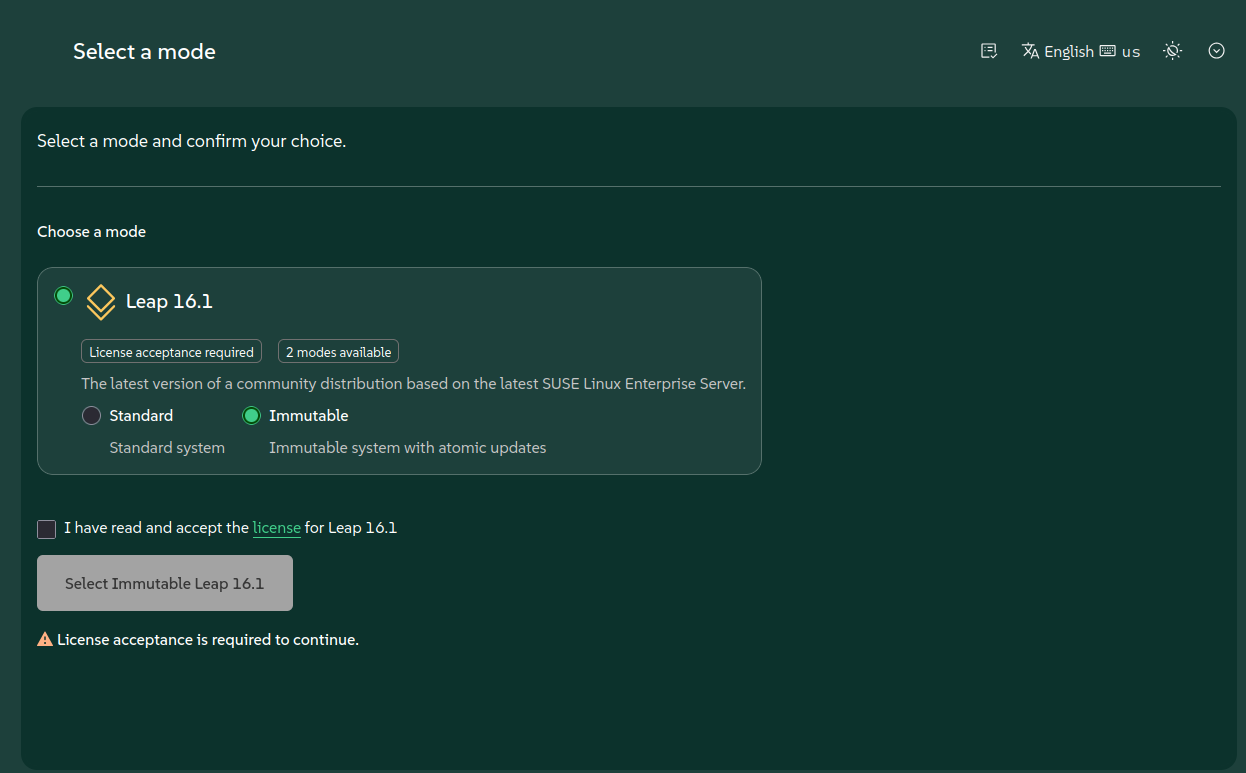
Doesn’t agama with dark theme look amazing? Once installed, the system is updated with transactional-update, which creates a new snapshot for every update and lets you roll back if something goes wrong.
sudo transactional-update dup    # update the system into a new snapshot
sudo reboot                      # boot into the new snapshot
sudo transactional-update rollback  # go back if something went wrong
Additional software is best consumed via containers with podman or distrobox, or via Flatpak on desktops. Packages can still be installed with sudo transactional-update pkg install <package>.
Leap Micro users: appliances are still here
Users who are used to the Leap Micro images will feel at home. The usual preconfigured appliances can be found in the alternative downloads section at get.opensuse.org. This includes the Immutable Self-install image, which is recommended for USB installations, as well as images for KVM/Xen, MS Hyper-V, VMware, Harvester and Cloud, and a fully encrypted raw disk image.
The appliances can be configured on first boot via Ignition or Combustion, just like Leap Micro.
Existing Leap Micro 6.2 installations can be migrated to Leap 16.1 in Immutable mode with the opensuse-migration-tool.
sudo transactional-update shell
# Inside the shell:
zypper in opensuse-migration-tool
opensuse-migration-tool --dry-run # optionally check how it looks
opensuse-migration-tool
exit && reboot # boot into the new snapshot
The tool is still experimental, so please make sure to have a backup and let us know how the migration went.
Desktops: Same GNOME, newer Plasma
Some users may expect a big GNOME update in Leap 16.1. In fact, Leap 16.1 ships the same GNOME 48 as Leap 16.0, with bug fix updates (gnome-shell 48.8 vs. 48.4 in 16.0).
Just like in Leap 15.X and the respective SUSE Linux Enterprise 15 service packs, the big GNOME update is planned over two releases.
Leap 16.0 and 16.1 share the same GNOME major version, and users can expect the next big GNOME update in a future release.
KDE Plasma users, on the other hand, get a noticeable bump from Plasma 6.4 to Plasma 6.6 with Qt 6.11 and KDE Frameworks 6.25.
LXQt moved from 2.2 to 2.4, and Xfce on Wayland continues with 4.20.
What’s new in Leap 16.1
Wondering which version of your favorite package you’ll get in Leap 16.1? Rather than listing a handful of packages here, we’d like to point you to our new openSUSE version diff tool.
It’s a single page comparing source package versions across Leap 16.1, Leap 16.0 and Tumbleweed, including the latest upstream versions from Repology.
The page republishes itself automatically, so it stays up to date during the whole RC phase and beyond. You can filter packages by status, e.g. to see what was updated compared to 16.0, or download the data as JSON or CSV.
The tool grew out of a community discussion at our weekly Release Engineering meeting; read more about it in One Page, Every Package.
Ideas and contributions are welcome at github.com/openSUSE/osdiff.
Help us with testing
Your feedback is critical at this stage. Help us with testing by following our manual test plan.
The plan covers scenarios that are hard to automate in openQA, so every test case marked as done on as many hardware combinations as possible helps us to ship a better release.
Simply record your result with your openSUSE ID; we intend to award Kudos badges to everyone participating in manual testing.
Alternatively, simply install Leap 16.1 RC, try the Immutable mode, your favorite desktop or your usual server workload, and let us know how it goes.
Please report any issues on bugzilla.opensuse.org.
Please make sure to check the Known bugs wiki page prior to reporting a new bug.
Thank you for testing and being part of the openSUSE community. Let’s shape Leap 16.1 together!